Virtual Medical Assistant vs In-Office Assistant: Which Is Better for Your Practice?
The comparison between a virtual medical assistant vs in-office assistant comes down to a question most practices never ask directly: which tasks genuinely require someone to be in the room? The default assumption is that in-office is the safer, more controllable model. That assumption rarely survives contact with the actual cost of the in-office hire, the HIPAA compliance requirements that apply regardless of where someone sits, or the proportion of daily administrative work that does not require physical presence to complete.
This guide covers both in-office roles, the front desk receptionist and the broader in-office admin employee, comparing each against a virtual medical VA across cost, task coverage, HIPAA compliance, and operational flexibility. The general cost and coverage framework between VA and in-house staffing models establishes the financial baseline; this post goes a layer deeper, comparing specific roles and what each one actually requires.
MedGather places office-based virtual medical assistants with US medical practices through a single flat monthly rate. That model is directly relevant to this comparison and is named throughout.
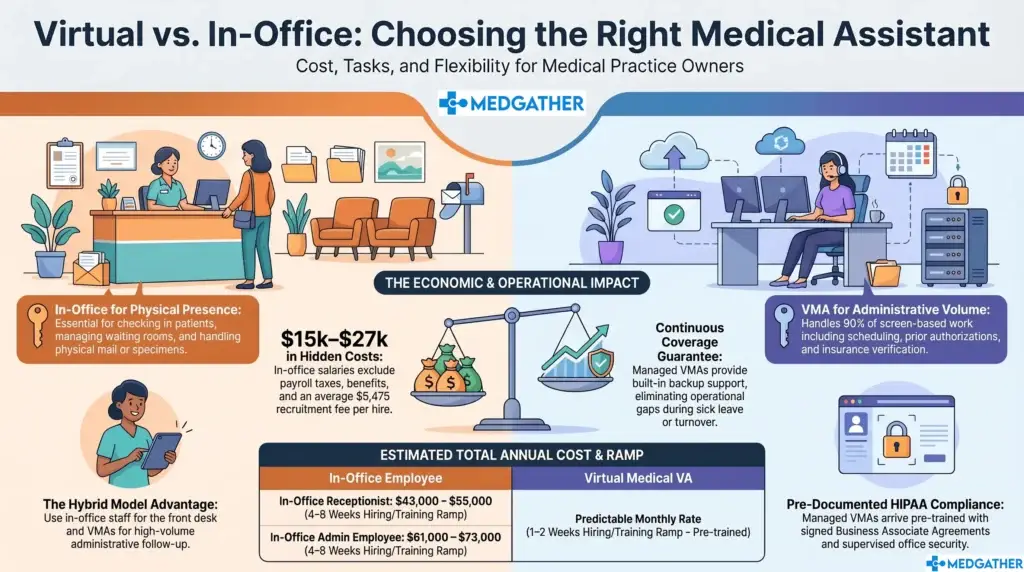
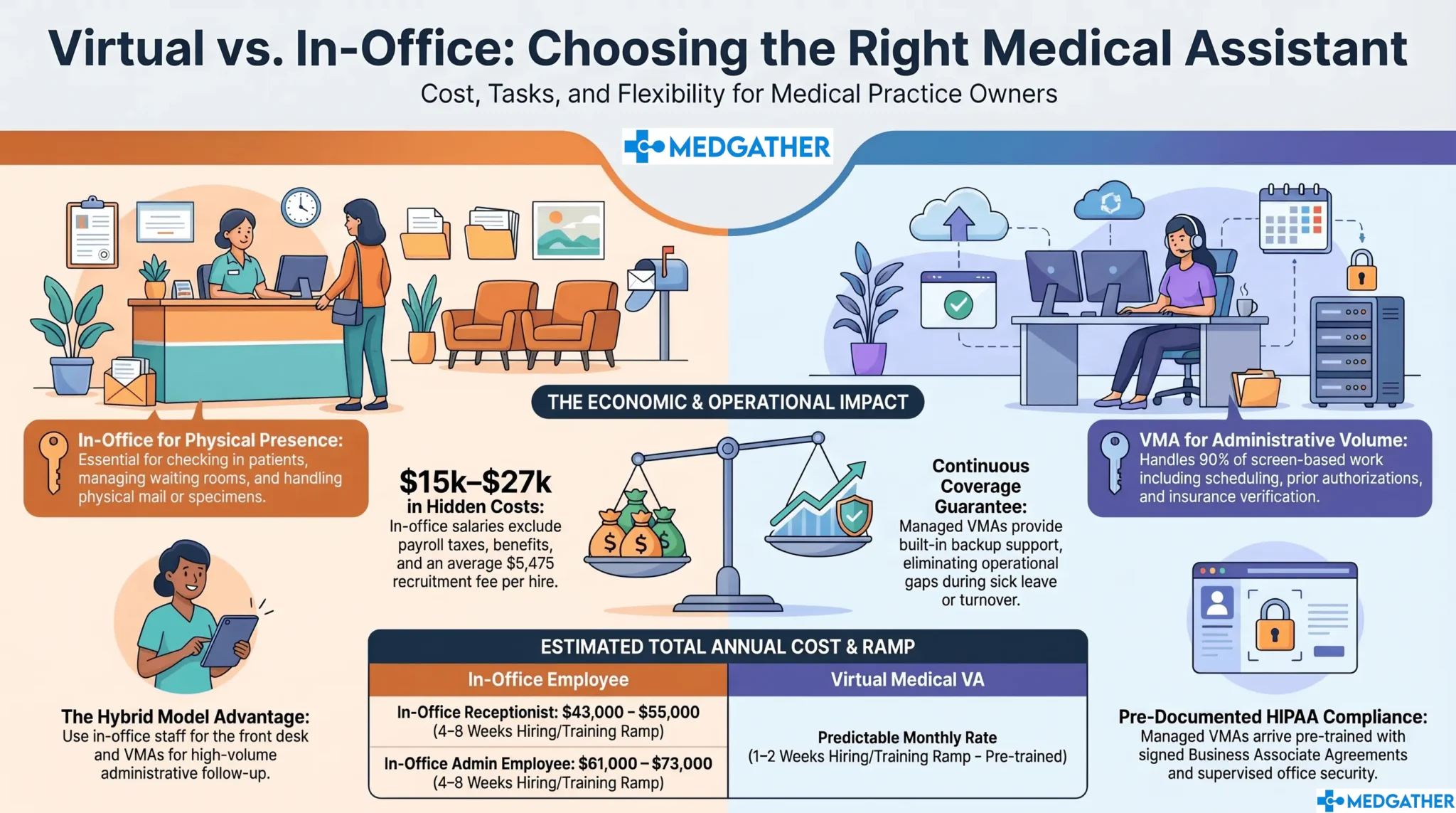
For most administrative tasks—scheduling, prior authorizations, insurance verification, patient communications, EHR documentation—a virtual medical assistant is lower cost, faster to onboard, and carries less employer liability than either in-office role.
For tasks that genuinely require physical presence—patient check-in at the front desk, on-site intake paperwork, in-person patient flow management—an in-office receptionist has a structural advantage no remote model can replicate.
The right question is not which is categorically better. It is which role you are actually filling, and whether physical presence is required to fill it.

Board-certified gastroenterologist and Founder of MedGather. Read full bio →
In This Guide
- What is the difference between a virtual medical assistant and an in-office assistant?
- How does cost compare between a virtual medical assistant and an in-office assistant?
- What tasks does a front desk receptionist handle that a virtual medical VA cannot?
- What tasks does an in-office medical admin handle that a virtual medical VA can match?
- How does HIPAA compliance work differently for each model?
- Which option is better for coverage, availability, and scalability?
- What does the full side-by-side comparison look like?
- Which is better for your practice? Frequently asked questions
What Is the Difference Between a Virtual Medical Assistant and an In-Office Assistant?
A virtual medical assistant (VMA) is a trained healthcare administrative professional who handles a practice’s administrative workload remotely from a managed, supervised office environment. The role covers scheduling, prior authorizations, insurance verification, patient communications, EHR data entry, and referral coordination. What the full scope of that task list looks like in practice goes through all 25 task categories in detail.
An in-office assistant is an on-site hire who works from within the practice’s physical location. The category covers two distinct roles that are often used interchangeably but carry different task profiles: the front desk receptionist and the in-office medical admin employee. The comparison with a virtual medical VA is meaningfully different for each one.
What does a front desk receptionist do?
The front desk receptionist handles patient check-in, manages the physical waiting room, answers the main practice line, and coordinates appointment scheduling at the desk. A significant share of the role involves direct patient interaction at the point of entry: greeting patients, verifying insurance at check-in, managing intake paperwork, and handling in-person patient communications as they arrive.
What does an in-office medical admin employee do?
The in-office medical admin employee handles the broader scheduling and administrative workload: prior authorization follow-up, insurance verification, referral coordination, EHR documentation, patient callbacks, and inbox management. Most of this work happens on a screen and a phone, not in person. The role of a medical virtual assistant in modern healthcare covers how these two functions relate in a typical US practice.
How Does the Cost of a Virtual Medical Assistant Compare to an In-Office Assistant?
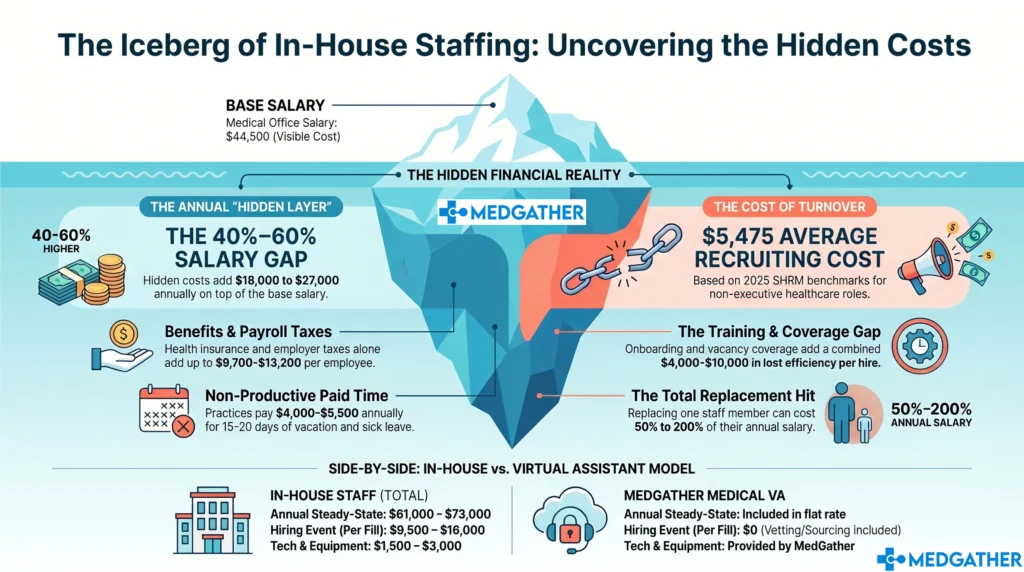
The cost comparison looks different depending on which in-office role you are measuring against. A front desk receptionist carries a lower base salary than a medical admin employee, but both accumulate the same employer-side cost layer once payroll taxes, benefits, paid time off, and recruiting costs are added. According to Bureau of Labor Statistics data, medical secretaries and administrative assistants earn a median of approximately $43,000 to $46,000 annually. Front desk reception roles in medical settings typically run $33,000 to $40,000 depending on location. In both cases, the salary line understates the true annual cost by $15,000 to $27,000 or more. What the full hidden cost layer of in-house staffing actually adds up to breaks down the complete calculation with verified figures.
Does the cost gap change for smaller practices?
For a solo or two-provider practice, the gap often matters more, not less. The same employer-side cost layer sits on top of the salary, but there is less revenue base to absorb it. Why the staffing cost impact tends to hit smaller practices first covers the economics of that decision for independent and smaller group practices specifically.
What Tasks Does a Front Desk Receptionist Handle That a Virtual Medical VA Cannot?
The front desk receptionist genuinely owns one task category that a virtual medical VA cannot replicate: physical presence at the point of patient entry. Patient check-in, management of physical intake forms, in-person waiting room flow, and any task that requires handling physical materials at the practice location belong in the building. Those are real tasks, and no virtual model substitutes for them.
What is worth examining is how much of a receptionist’s actual workday those physical tasks represent. A practice seeing 20 to 30 patients per day will have check-in activity concentrated in arrival windows, typically the first 30 to 60 minutes of the morning and around the midday appointment block. The rest of the workday, phone calls, appointment confirmations, insurance verification, patient callbacks, scheduling adjustments, and inbox management, runs on a screen and a phone, not on physical presence.
Which front desk tasks genuinely require someone on-site?
- Patient check-in and ID or insurance card verification at the desk. This is the core physical-presence task. It requires someone physically at the front desk to greet and process arriving patients.
- Management of physical intake and consent forms. Practices that still use paper intake packets need someone on-site to distribute, collect, and file them. Practices using digital intake systems reduce this requirement significantly.
- In-person waiting room coordination. Communicating wait times directly to patients in the waiting room, managing in-person patient flow, and handling the immediate in-clinic experience all require physical presence.
- Handling of physical materials. Mail, fax printouts, on-site supply management, and specimen labels at check-in are tasks that require someone to physically be there.
Everything outside that list , scheduling, appointment confirmations, insurance verification, prior authorization follow-up, referral coordination, patient communications, inbox management , can be handled by a virtual medical VA. How a VA handles the full scope of referral and administrative follow-up tasks shows where the task handoff is practical and where it is not.
What Tasks Does an In-Office Medical Admin Handle That a Virtual Medical VA Can Match?
The in-office medical admin employee is a different role from the front desk receptionist, and the overlap with a virtual medical VA is substantially larger. Most of what a medical admin employee handles runs on a screen: EHR data entry, prior authorization submissions, insurance verification, scheduling, patient communications, and referral coordination. Physical presence is rarely required for any of it.
A VA placed through MedGather arrives trained on the systems and workflows that directly overlap with this role, including scheduling platforms, EHR systems such as Epic, Athenahealth, eClinicalWorks, and Modmed, prior authorization follow-up, and patient communication management. What a virtual medical assistant handles across lab orders, scheduling, and administrative follow-up maps the specific task coverage in more detail.
Can a virtual medical VA cover the full scope of an in-office admin role?
For the screen-based portion of the role: yes, in most cases. The exception is tasks that require physical proximity, such as on-site filing of physical documents, in-office supply ordering and receipt, and any coordination that requires handing something directly to a provider or patient on-site. Those tasks represent a small portion of the total administrative load for most practices.
One important scope note: MedGather’s virtual medical assistant model does not include medical billing or revenue cycle management services. Billing and coding is a separate function that practices typically manage through a dedicated billing vendor or in-house billing staff. The VA model covers administrative, scheduling, and patient communication workflows.
How Does HIPAA Compliance Work Differently for a Virtual Medical Assistant vs. an In-Office Assistant?
A common assumption is that in-office automatically means more secure. It does not. The office is only as compliant as its training, its systems, and its documented practices allow. An in-office employee handling patient data on a personal device, sharing login credentials, or accessing records from an unsecured workstation is a HIPAA exposure regardless of physical location.
For any staff member handling patient data, whether in-office or virtual, HIPAA compliance depends on three things: a signed Business Associate Agreement (BAA) in place before patient data is accessed, HIPAA training completed and documented before the first day, and a working environment that meets the Security Rule’s physical and technical safeguard requirements. Those requirements apply to an in-office employee under your own roof exactly as they apply to a VA working from a remote location.
MedGather’s model addresses all three: a BAA is executed before any VA touches patient data, HIPAA training is completed and documented pre-assignment, and every VA works from a supervised office environment with company-issued devices. How HIPAA compliance works specifically for virtual medical assistant arrangements covers the regulatory requirements and what a compliant structure looks like in practice.
Which Option Is Better for Coverage, Availability, and Scalability?
In-office assistants work set hours. When they call in sick, take vacation, or leave the practice, the coverage disappears. A practice running on one receptionist and one admin employee faces a genuine operational gap any time either position is unavailable. That gap has a cost in delayed patient communications, missed prior authorization follow-up, and the additional load pushed onto the physician and clinical staff.
A managed virtual medical VA arrangement operates differently on all three dimensions. Coverage is continuous because the service model includes backup support; if one VA is unavailable, the practice is not left without coverage. Availability can be structured to extend beyond standard office hours for practices that field administrative requests outside the 9-to-5 window. Scalability happens through the existing service relationship rather than through a new four-to-eight-week hiring cycle.
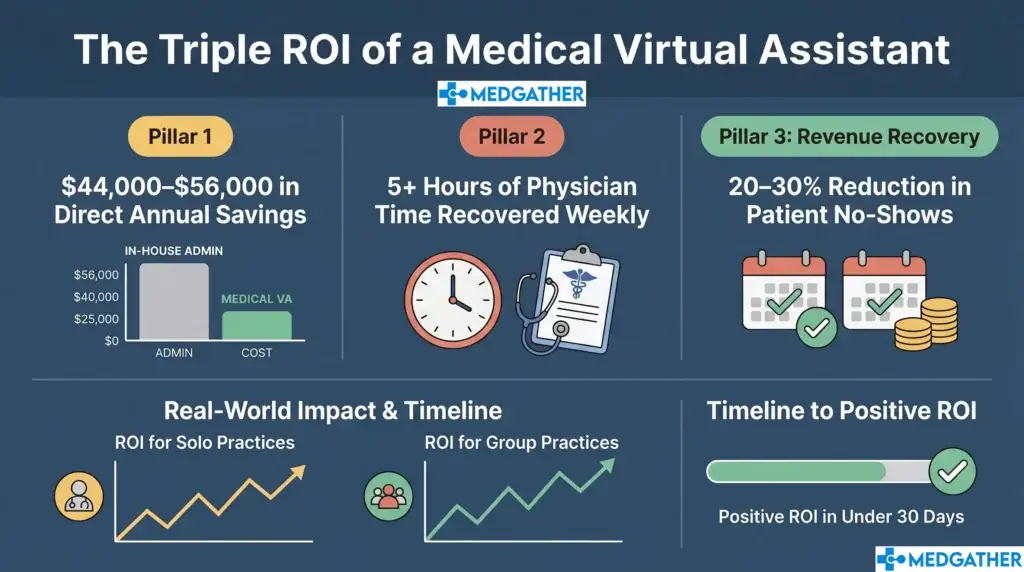
For practices managing high patient volume or running with lean administrative staff, how a virtual medical assistant model supports capacity at busy and high-volume clinics covers the operational structure in more detail. The measurable efficiency gain practices typically see after the switch tracks what happens once the administrative workload has a dedicated owner.
What Does the Full Virtual Medical Assistant vs. In-Office Assistant Comparison Look Like?
The table below compares a virtual medical VA against both in-office roles across cost, compliance, task coverage, and operational factors.
Virtual Medical Assistant vs. In-Office Assistant: Full Comparison
| Cost and Operations Category | Virtual Medical VA | In-Office Receptionist | In-Office Admin Employee |
| Cost and Compliance | |||
| Annual base pay | Predictable monthly rate — see medgather.co/book-now/ | $33,000 to $40,000 (BLS est., reception roles) | $43,000 to $46,000 (BLS 2024, medical secretaries) |
| Employer payroll taxes | None | $2,500 to $3,100 | $3,700 to $4,200 |
| Health insurance and benefits | None | $6,000 to $9,000 | $6,000 to $9,000 |
| HIPAA training and BAA | Included — pre-assignment and documented before day one | Practice arranges and verifies independently | Practice arranges and verifies independently |
| PTO and sick leave cost | None — continuous coverage | $2,500 to $3,500 (est.) | $4,000 to $5,500 |
| Recruitment cost per hire | Included in model | $5,475 avg. (SHRM 2025) | $5,475 avg. (SHRM 2025) |
| Training ramp to productivity | 1 to 2 weeks — pre-trained on healthcare workflows | 4 to 8 weeks (in-practice) | 4 to 8 weeks (in-practice) |
| Steady-state annual cost (est.) | Single monthly rate — no separate employer burden | ~$43,000 to $55,000/yr | ~$61,000 to $73,000/yr |
| Operations and Coverage | |||
| Physical check-in presence | Not applicable — remote model | Available — direct patient interaction at desk | Limited — primarily desk-based admin tasks |
| After-hours availability | Flexible — available beyond standard office hours | Not standard — set scheduled hours | Not standard — set scheduled hours |
| Scalability | Adjust scope through existing service relationship | New hire required per position added | New hire required per position added |
| Turnover risk | Low — managed model with backup coverage built in | High — healthcare admin turnover 20–30% annually | High — healthcare admin turnover 20–30% annually |
| Coverage when position is vacant | Continuous — backup model included | Gap until replacement is hired (4–8 weeks avg.) | Gap until replacement is hired (4–8 weeks avg.) |
Which Is Better for Your Practice: A Virtual Medical VA or an In-Office Assistant?
The answer depends on which question you are actually trying to answer. If the question is who handles patient check-in at the physical front desk, an in-office receptionist is necessary. That is a physical-presence requirement, and no virtual model replaces it. This post is not arguing otherwise.
If the question is who handles the administrative workload that drives the rest of the practice , scheduling, prior authorizations, insurance verification, patient communications, EHR data entry, referral coordination , that is where the comparison tilts consistently toward the virtual medical VA model on cost, compliance predictability, and operational flexibility. That is also the larger portion of the daily workload for most US medical practices.
The decision rarely has to be either/or. Some practices run an in-office receptionist for physical check-in and use a virtual medical VA for everything else. That model captures the physical presence advantage for front-of-house tasks and the cost and compliance advantages of the virtual model for the administrative load. What the total return from removing that employer-side cost layer actually looks like in numbers works through the calculation in detail.
MedGather provides office-based virtual medical assistants to US medical practices through a single flat monthly rate that covers training, HIPAA compliance infrastructure, and managed supervision. The model is built specifically around the administrative task scope that does not require physical presence, which is the majority of the daily administrative workload for most practices. How MedGather’s vetting and placement process works before a VA starts at your practice covers the hiring model in detail. How the cost of a managed agency placement compares to hiring independently addresses the model comparison directly.
If your practice is at the point of evaluating both options seriously, a free consultation is the most direct way to see what a virtual medical VA model looks like for your specific patient volume and task scope.
See what MedGather's office-based virtual medical VA model looks like for your practice.
Our assistants are pre-trained on healthcare workflows, HIPAA-compliant from day one, and placed through a flat monthly rate that eliminates the employer-side cost layer compared here.
Frequently Asked Questions
What is the difference between a virtual medical assistant and an in-office assistant?
A virtual medical assistant handles a practice’s administrative workload remotely from a managed, supervised office environment, covering scheduling, prior authorizations, insurance verification, patient communications, and EHR data entry. An in-office assistant works on-site and may be a front desk receptionist, handling physical check-in and patient-facing arrival tasks, or a broader medical admin employee whose work is primarily screen-based and overlaps substantially with what a virtual medical VA handles. The two categories differ primarily in physical presence requirements and the associated employer-side cost structure.
Is a virtual medical assistant cheaper than an in-office assistant?
In most cases, yes, once the full cost is counted rather than salary alone. Bureau of Labor Statistics data puts the base salary for in-office medical admin roles at $43,000 to $46,000, with a fully loaded annual cost of $61,000 to $73,000 once payroll taxes, benefits, PTO, management time, and technology are included. Front desk receptionist roles run lower at approximately $33,000 to $40,000 in base salary but carry the same employer-side cost layer. A virtual medical VA model eliminates most of that cost layer and reduces recruiting and onboarding costs as well.
Can a virtual medical assistant replace a front desk receptionist?
Partially. A virtual medical VA can handle the phone, scheduling, insurance verification, and administrative tasks that make up the majority of a receptionist’s workday. What a VA cannot do is physically check patients in at the front desk, manage intake paperwork at the point of arrival, or handle tasks that require physical presence at the practice location. Practices with walk-in patient volume typically need some in-office coverage for those physical tasks, even when a VA handles the rest of the administrative workload.
How does HIPAA compliance work for a virtual medical assistant vs. an in-office assistant?
HIPAA compliance for any staff member, whether in-office or virtual, requires a signed Business Associate Agreement before patient data is accessed, documented HIPAA training before the first day, and a working environment that meets the Security Rule’s physical and technical safeguard requirements. In-office does not automatically mean more compliant. A well-structured managed VA arrangement, such as MedGather’s model with pre-assignment training, a signed BAA, and company-issued devices in a supervised office, can meet all three requirements more consistently than a self-managed in-office setup.
Which is better for a solo practice: a virtual medical assistant or an in-office assistant?
For most solo practices, the cost advantage of the virtual model is more pronounced because there is less revenue base to absorb the employer-side cost layer of an in-office hire. A single fully loaded in-office admin position at $61,000 to $73,000 per year represents a significant portion of a solo practice’s overhead. Why solo and independent practices often move to the virtual model first covers the economics of that decision in detail.
Sources
- Bureau of Labor Statistics. Occupational Outlook Handbook – Medical Secretaries and Administrative Assistants.
- Bureau of Labor Statistics. Occupational Outlook Handbook – Receptionists and Information Clerks.
- Society for Human Resource Management. 2025 Talent Acquisition Benchmarking Report – Cost Per Hire.
Illustrative estimates only: Figures in this guide are general industry estimates built from published data sources. Actual costs vary by location, role scope, benefits package, and practice size. This information is provided for educational purposes only and is not a guarantee of savings or outcomes for any specific practice.