Virtual Assistant New Patient Intake: Can It Be Delegated?
Yes. A virtual assistant can handle the core of a new patient intake workflow, specifically Patient Scheduling, Patient Communications, and HIPAA Compliant Data Management including demographic data entry, which together cover most of the intake process before a patient ever reaches the front desk. This is the virtual assistant new patient intake model MedGather places with US medical practices, and it is the scope this guide covers.
This guide breaks down exactly which intake tasks MedGather’s virtual assistants handle, which require in-person staff, how HIPAA compliance applies when a VA is managing new patient data, and the specific steps to set up the delegation. Where new patient intake fits within MedGather’s full service offering places it in context alongside the 14 other services MedGather places.
MedGather offers 15 medical VA services including Prior Authorizations, Patient Scheduling, Patient Communications, Insurance Verification, Chart preparations, and HIPAA Compliant Data Management, among others. This guide focuses on the intake-specific subset. Each service is covered in its own dedicated post within MedGather’s content cluster.
TL;DR, Can a Virtual Assistant Handle New Patient Intake?
Yes. MedGather’s virtual assistants handle Patient Scheduling, Patient Communications, and HIPAA Compliant Data Management including demographic data entry, the three services that cover most new patient intake before the patient arrives.
What stays in-house: in-person identity and insurance card verification at check-in, and anything requiring clinical judgment. Insurance Verification is a separate MedGather service handled in its own workflow, not part of this intake-focused guide.
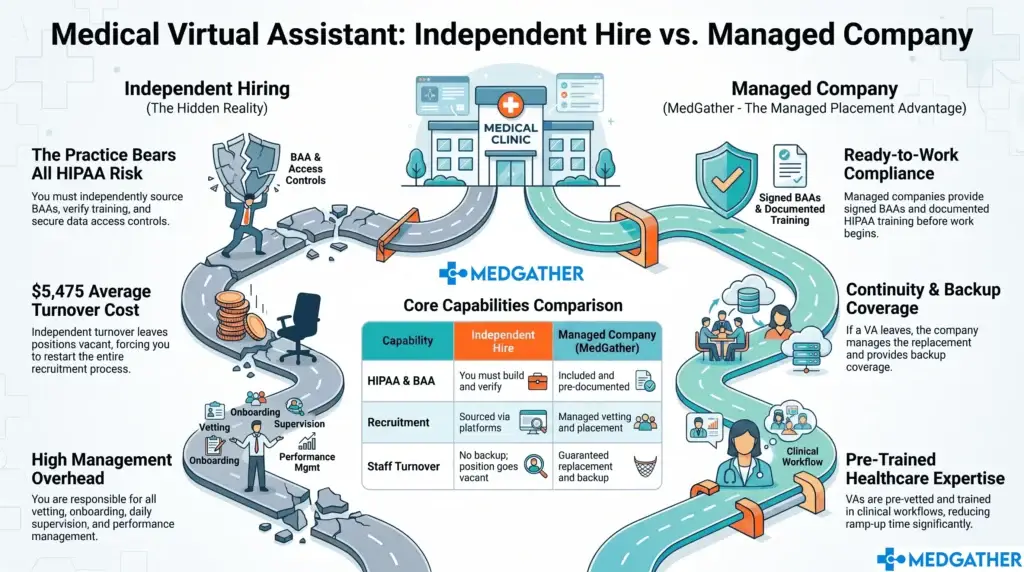
With a signed BAA and documented HIPAA training in place before day one, MedGather VA-handled intake meets the same compliance standard as in-house intake.

Board-certified gastroenterologist and Founder of MedGather. Read full bio →
In This Guide
- Can a virtual assistant handle new patient intake?
- Which MedGather services cover new patient intake specifically?
- What parts of new patient intake stay in-house, and which use a separate workflow?
- How do you delegate new patient intake to a virtual assistant?
- Is Patient Intake Handled by a Virtual Assistant HIPAA-Compliant?
- What does a typical new patient intake workflow look like with a virtual assistant?
- How does new patient intake fit into MedGather’s broader service model?
Can a Virtual Assistant Handle New Patient Intake?
Yes, for the scheduling, communication, and data management portions of the process. MedGather’s Patient Scheduling, Patient Communications, and HIPAA Compliant Data Management services directly cover the administrative steps that happen before a patient is in the building. Processes involve booking the first appointment, sending intake packets, following up on incomplete forms, and entering demographic information into the EHR or practice management system.
What a virtual assistant does not replace is anything that requires the patient to be physically present or requires clinical judgment. Insurance Verification is also a MedGather service, but is handled as a distinct workflow separate from the intake steps covered here.
Which MedGather Services Cover New Patient Intake Specifically?
Five of MedGather’s 15 medical VA services apply directly to the new patient intake workflow.
- Patient Scheduling. Booking the new patient’s first appointment, selecting the correct visit type and duration, sending confirmation, and following up if the patient has not responded within a set window. This is MedGather’s core intake-facing service.
- Patient Communications. Sending the practice’s digital intake packet, tracking which forms have been completed, following up with patients who have not submitted their forms, and delivering a welcome message with what to expect before the first visit.
- HIPAA Compliant Data Management. Recording patient demographic information, including name, date of birth, address, contact details, and emergency contact, into the EHR or practice management system from the completed intake forms, with PHI handling governed by a signed BAA and pre-assignment HIPAA training.
- Chart preparations. Setting up the new patient chart ahead of the first visit, ensuring all demographic fields are populated, and the appointment is linked correctly in the EHR before the provider opens the chart.
- Administrative Support. The general administrative coordination that connects the intake steps: managing the scheduling queue, following the practice’s intake communication cadence, and flagging incomplete records before the visit.
Insurance Verification, which confirms active coverage and plan details, is also a MedGather service. It is not covered in this guide because it operates on a different timing and data workflow from the scheduling, forms, and demographics steps above. How MedGather’s lab order and scheduling support connects to intake shows the related workflow that picks up once a patient is established.
What Parts of New Patient Intake Stay In-House or Use a Separate Workflow?
Two categories require in-house staff, and one uses a separate MedGather workflow rather than the intake steps covered here.
- In-person identity and insurance card verification at check-in. Physically confirming a patient’s ID and insurance card on the day of the visit requires someone at the front desk. This is a physical-presence task no VA workflow replaces.
- Clinical intake. Vitals, chief complaint documentation, and any clinical assessment at the start of the visit require a licensed clinical staff member, not an administrative VA.
- Insurance Verification as a workflow. MedGather offers Insurance Verification as one of its 15 services. However, confirming active coverage and benefit eligibility operates on its own timing cycle, typically run before the appointment rather than as part of scheduling and demographic entry. It is handled through a separate dedicated workflow and is not part of the intake steps this guide covers.
Everything else in the new patient pathway, the scheduling, the communications, the form management, and the demographic entry, sits within the five intake-relevant services described in the section above.
How Do You Delegate New Patient Intake to a Virtual Assistant?
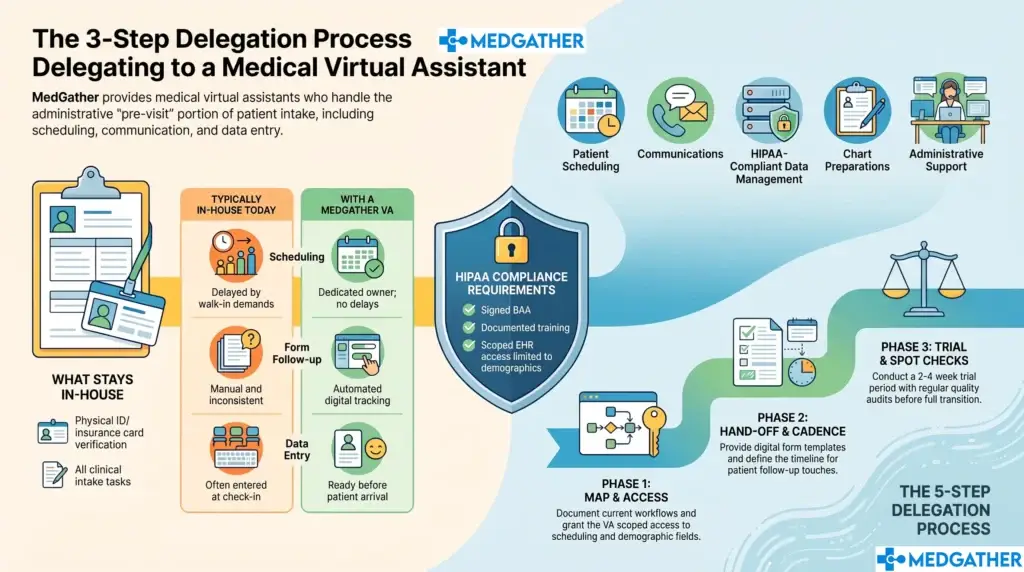
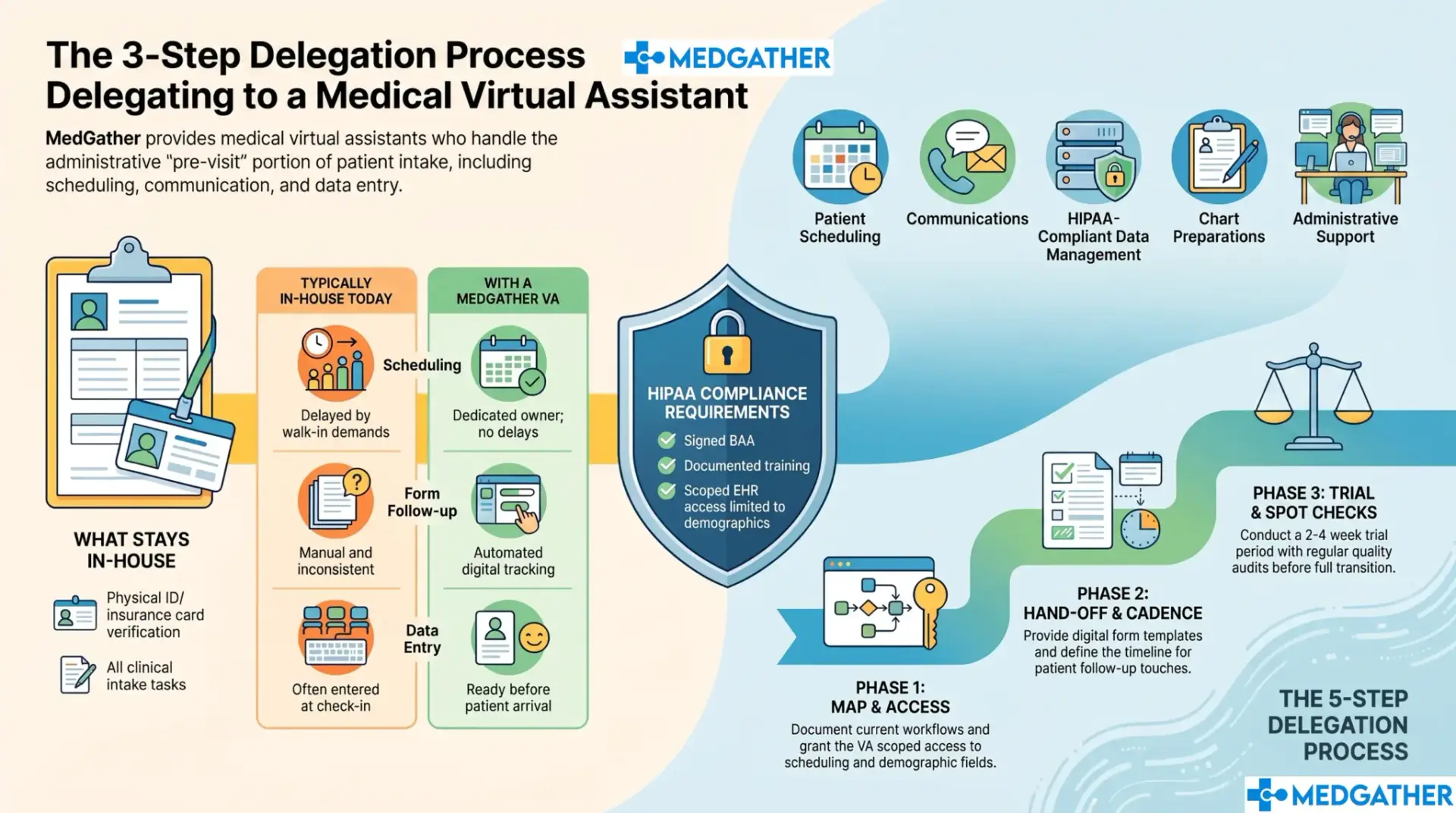
Delegating new patient intake to a MedGather VA follows a five-step setup process that MedGather’s onboarding process front-loads before the VA’s first day.
How To Delegate New Patient Intake to a Virtual Assistant
- Step 1. Map your current intake workflow. Document exactly how a new patient is scheduled today, which forms are sent, and which fields are entered into the EHR at demographic setup.
- Step 2. Grant scoped EHR and scheduling system access. The VA needs access to the scheduling module and patient demographic fields, not full chart access, consistent with the HIPAA minimum necessary standard.
- Step 3. Hand off the digital intake form templates. Whatever forms the practice uses are given to the VA to distribute and track electronically through the Patient Communications workflow.
- Step 4. Set the follow-up cadence. Define how soon after scheduling the intake packet goes out and how many follow-up touches occur if forms are not returned before the visit.
- Step 5. Run a short trial period with spot checks. Most practices run two to four weeks of VA-handled intake alongside spot checks before fully handing off the workflow.
MedGather’s onboarding process covers most of this setup before the VA’s first day. How the MedGather placement and vetting process works before a VA starts covers the full structure.
Is Patient Intake Handled by a Virtual Assistant HIPAA-Compliant?
Yes, when the three requirements that apply to any staff member handling patient data are in place: (1) a signed Business Associate Agreement before any patient data is accessed, (2) documented HIPAA training completed before day one, and (3) a working environment that meets the Security Rule’s physical and technical safeguard requirements.
New patient intake involves protected health information (PHI) from the first form a patient submits. Name, date of birth, contact information, and insurance details are all PHI under HIPAA. The compliance bar for handling that data does not change based on whether the person entering it is in the building or working remotely. MedGather’s HIPAA Compliant Data Management service is built around this requirement: the BAA is signed before any VA accesses patient records, HIPAA training is completed and documented pre-assignment, and the VA works from a supervised office with company-issued devices.
The VA’s EHR access should also be scoped to demographic fields rather than the full chart, consistent with HIPAA’s minimum necessary standard for administrative staff. How HIPAA compliance is structured for every MedGather VA placement covers the BAA, training, and supervised environment requirements in full.
Outbound source: U.S. Department of Health and Human Services. HIPAA Security Rule – minimum necessary standard and Business Associate Agreement requirements.
What Does a Typical New Patient Intake Workflow Look Like With a Virtual Assistant?
The table below compares each intake step as it typically runs in-house today against how it operates when MedGather’s Patient Scheduling, Patient Communications, and HIPAA Compliant Data Management services are handling the same steps.
| Intake Step | Typically In-House Today | With a MedGather Virtual VA |
| Appointment scheduling (Patient Scheduling) | Handled between other front-desk duties, can be delayed during busy periods | Dedicated owner via Patient Scheduling service, no competition with walk-in demands |
| Intake form distribution and follow-up (Patient Communications) | Often paper-based or manually emailed, follow-up inconsistent | Digital distribution and tracked follow-up through Patient Communications workflow |
| Demographic data entry (HIPAA Compliant Data Management) | Entered when time allows, sometimes day-of during check-in | Entered before the visit via HIPAA Compliant Data Management, reducing day-of check-in load |
| Chart setup (Chart Preparations) | Set up same day or left incomplete until check-in | Prepared ahead of visit through Chart Preparations service |
| Pre-visit communication (Patient Communications) | Inconsistent, depends on front-desk bandwidth | Standardized welcome message and visit instructions via Patient Communications |
How Does MedGather's Broader Service Model Fit Around New Patient Intake?
New patient intake is one entry point into MedGather’s 15-service medical VA model. The intake-facing services, Patient Scheduling, Patient Communications, HIPAA Compliant Data Management, Chart preparations, and Administrative Support, are typically the first workflows a practice hands off. Once those are running, most practices add additional services from MedGather’s offering: Prior Authorizations, Insurance Verification, Referral Managements, Prescription Refills, Order Processing, and others, each handled by the same VA under the same BAA and compliance structure.
Every MedGather placement includes a signed BAA before any patient data is accessed, documented HIPAA training pre-assignment, and a supervised office environment with company-issued devices. The compliance infrastructure does not change as additional services are added. What the administrative task scope looks like once intake is established and the VA takes on additional MedGather services maps out that broader scope. How practices measure efficiency improvements after handing off the intake and administrative workflows tracks the operational impact once the full handoff is in place.
See how new patient intake would work with a MedGather virtual assistant.
Every placement includes a signed BAA, pre-assignment HIPAA training, Patient Scheduling, Patient Communications, and HIPAA Compliant Data Management from day one
Key Takeaways, Virtual Assistant New Patient Intake
- MedGather's Patient Scheduling, Patient Communications, and HIPAA Compliant Data Management services cover the core of new patient intake before a patient reaches the front desk.
- In-person check-in and clinical intake stay with in-house staff. Insurance Verification is a separate MedGather service with its own workflow, not part of the scheduling-and-demographics intake steps.
- HIPAA compliance for VA-handled intake requires a signed BAA, documented training before day one, and scoped EHR access limited to demographic fields rather than the full chart.
- Delegation follows five steps: map the workflow, grant scoped access, hand off form templates, set a follow-up cadence, and run a short trial period.
- Most practices start with intake-facing services and expand into Prior Authorizations, Insurance Verification, and Referral Managements under the same VA and the same compliance structure.
Frequently Asked Questions
Can a virtual assistant handle new patient intake forms?
Yes. MedGather’s Patient Communications service handles distributing digital intake forms, tracking which patients have completed them, following up with patients who have not submitted, and entering the completed information through the HIPAA Compliant Data Management workflow.
Is it HIPAA compliant for a virtual assistant to collect patient demographics?
Yes. MedGather’s HIPAA Compliant Data Management service requires a signed Business Associate Agreement before any data is accessed, documented HIPAA training before the VA’s first day, and scoped EHR access limited to demographic fields rather than the full patient chart. These are the same requirements that apply to any staff member for handling protected health information.
Does MedGather also handle insurance verification for new patients?
Yes, Insurance Verification is one of MedGather’s 15 medical VA services. It operates as a separate workflow from the Patient Scheduling, Patient Communications, and HIPAA Compliant Data Management steps covered in this guide, because confirming active coverage and benefit eligibility runs on a different timing cycle from the intake form and demographic process.
How do I start delegating new patient intake to a virtual assistant?
Start by mapping your current intake workflow, then grant the VA scoped access to your scheduling system and the demographic fields in your EHR, hand off your existing intake form templates, set a follow-up cadence for incomplete forms, and run a short trial period with spot checks. MedGather’s onboarding process covers most of this setup before the VA’s first day.
Does a MedGather virtual assistant work directly in my EHR for patient intake?Does a MedGather virtual assistant work directly in my EHR for patient intake?
Yes, with scoped access limited to scheduling and demographic entry rather than full chart access. MedGather VAs are trained on major EHR platforms including Epic, Athenahealth, eClinicalWorks, and Modmed before placement. How the VA’s service scope typically expands beyond intake as the relationship grows covers what additional workflows are typically added after intake.
Board-certified gastroenterologist and Founder of MedGather. Read full bio →
- U.S. Department of Health and Human Services. HIPAA Security Rule – minimum necessary standard and Business Associate Agreement requirements.
- Medical Group Management Association. MGMA DataDive – Cost and Revenue / Practice Operations, patient access and intake workflow benchmarking.
- American Medical Association. AMA practice management guidance on new patient registration and intake workflows.