Integrate aMedical Virtual Assistant Into Your Practice: A 4-Step Guide
Hiring a medical virtual assistant is one decision. Getting the most out of one is another.
Small and mid-sized practices that struggle with the integration process usually hit the same wall. They bring someone in without a clear task structure, expect results immediately, and when the transition feels bumpy, they write the whole model off. The problem was almost never the assistant. It was the setup.
Done right, when you integrate a medical virtual assistant, the process takes one to two weeks and produces a noticeable shift in how your team operates within the first month. This post walks through the 4-step process MedGather uses, what to prepare before your MVA starts, and why the staffing model behind your assistant matters as much as the individual you bring in. If you are still working out whether an MVA is the right fit for your workflow, how medical virtual assistants improve day-to-day practice operations is worth reading first.
TL;DR: How Do You Integrate a Medical Virtual Assistant?
Successfully integrating a medical virtual assistant (MVA) starts with a structured onboarding process. The practice should define the assistant’s responsibilities, provide secure access to the necessary systems, complete workflow training, and establish clear communication before the MVA begins working independently. Most practices can complete implementation within one to two weeks.
A managed provider simplifies this process by handling recruitment, healthcare-specific training, HIPAA compliance, and ongoing supervision before the assistant is assigned to your practice. This reduces onboarding time, minimizes operational disruption, and helps the MVA become productive more quickly.
Practices that prepare task lists, user accounts, EHR access, and a dedicated point of contact before the start date often see smoother adoption and measurable workflow improvements within the first 30 to 90 days.

Board-certified gastroenterologist and Founder of MedGather. Read full bio →
In This Guide
- Why freelance virtual assistants create more problems than they solve
- The 4-step MedGather integration process
- What to have ready before your MVA starts
- What integration looks like at 30, 60, and 90 days
Why Freelance Virtual Assistants Create More Problems Than They Solve
Before getting into how integration works at MedGather, it is worth addressing what many practices get wrong the first time around.
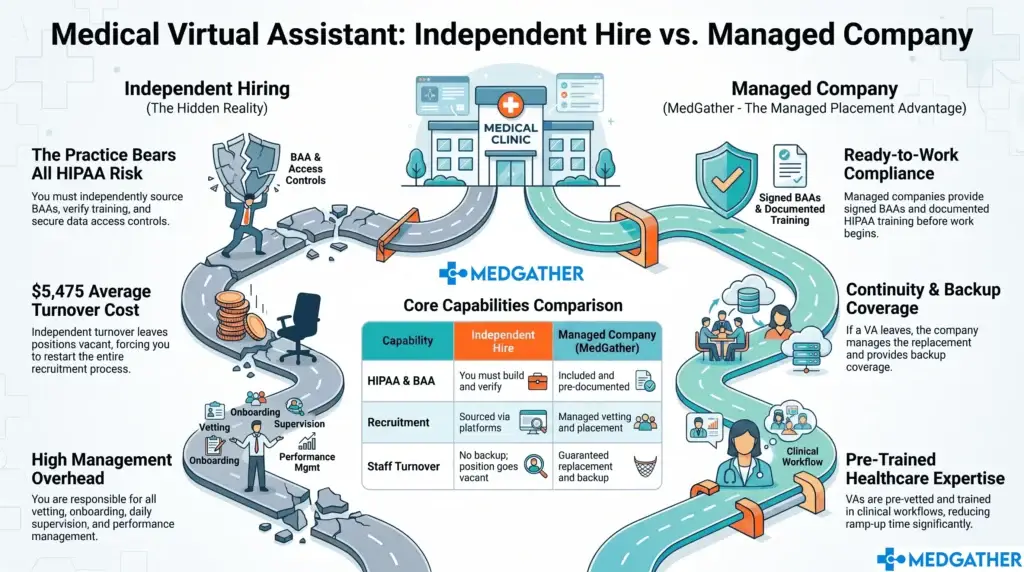
A lot of clinics try a freelance virtual assistant first. The hourly rate looks attractive. The setup seems simple. The whole arrangement appears low risk. But the trade-offs tend to surface within the first few weeks and they are consistent enough across practices that they are worth naming directly.
- No oversight or accountability. Freelance virtual assistants operate independently with no supervision structure behind them. If productivity drops or a task gets missed, there is no escalation path and nobody is checking the work between you and them.
- Inconsistent availability. Freelancers manage multiple clients at once. Your practice competes for their attention, and there is no guaranteed coverage when your clinic needs it most, especially during high-volume periods or when urgent tasks come in without warning.
- Security exposure. A freelance VA working from a personal device on an unsecured home network creates real exposure for patient data. Most freelance arrangements carry no formal HIPAA compliance structure, no backup systems, and no workspace audit process. That exposure sits with your practice.
- No clinical background. General virtual assistants are not trained for healthcare workflows. Putting someone unfamiliar with EHR platforms, prior authorization processes, or clinical documentation into a medical practice creates errors that take time to find and fix, often at the expense of the clinical staff who catch them.
Remote Work’s Dark Secret: Why 70% of Companies Fear Their Own Hybrid Employees
For a side-by-side look at how different virtual assistant models compare across oversight, compliance, and cost, the MedGather Alternatives page breaks down the trade-offs in detail. And if you want to understand the pattern of practices that tried the freelance route first and switched, the Why Top Practices Switch page covers exactly that.
How to Integrate a Medical Virtual Assistant: The 4-Step MedGather Process
MedGather’s assistants do not arrive on day one needing to be trained from scratch. The groundwork is done before they are assigned to your practice. Here is how the process is structured from first contact to full task activation.
Step 1: Matching
Before anyone is assigned to your clinic, MedGather matches the right assistant to your specific workflows. Practice size, patient volume, specialty, and task requirements all factor into who gets assigned. You are not getting whoever happens to be available that week. You are getting someone selected for your setup.
This step matters more than it looks. A mismatch at the matching stage creates friction that slows the onboarding and produces worse results than a well-matched placement would. A primary care-focused MVA placed into a neurology clinic with structured documentation requirements will take significantly longer to reach productive output than one who already has that background. Getting the match right at the start is what makes the first two weeks run smoothly.
The criteria that go into a strong match are rooted in the skills the MVA brings before they walk in. What a qualified MVA should have before your practice ever sees their name is worth reviewing so you know what to expect and what to verify.
Step 2: Pre-Assignment Screening
Every MedGather assistant completes a background check before being endorsed to a client. This is not optional and it is not abbreviated. It is a standard requirement for every placement.
HIPAA compliance training is mandatory before any patient data access begins. Each assistant operates from a workspace with a stable primary internet connection and a documented backup system. Company-issued devices are used for all client work. Personal equipment does not touch client systems.
On the question of patient data security: every MedGather assistant works from a supervised, office-based environment with HIPAA compliance built into the daily workflow. There are no personal devices, no unsecured networks, and no gaps in the data privacy chain between the assistant and your practice. How that office-based model is structured and what it means for your practice’s compliance exposure is explained in detail on the Remote Medical Office page.
Step 3: Onboarding and Workflow Training
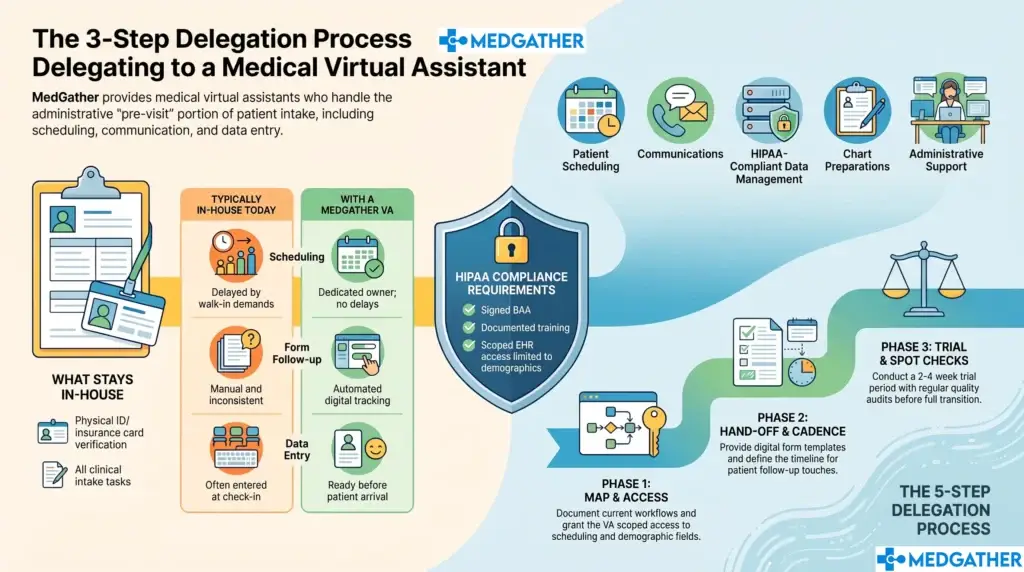
MedGather’s onboarding and workflow training runs one to two weeks. This is where the integration actually happens: the assistant learns how your practice operates, which EHR system you use, how your scheduling is structured, what your documentation preferences are, and how your providers like information organized and communicated.
Assistants arrive already proficient across Epic, Athenahealth, eClinicalWorks, Modmed, and other major platforms. The EHR learning curve is minimal. What the onboarding week focuses on instead is your specific workflows: your templates, your task priorities, your communication cadence, and the preferences of the providers being supported.
On the question of workflow disruption: the integration is designed to fit around your existing setup, not replace it. Your in-house team keeps doing what they do. The MVA takes over the administrative layer that was slowing them down. The first week requires some time from your team for briefings and workflow documentation, and that investment is exactly what prevents a longer adjustment period later.
A useful way to approach this step is to treat it as building the operational documentation your practice has probably never had written down. Once it exists, the range of tasks that can transfer to a properly onboarded MVA is considerably wider than most practices expect when they first start mapping it out.
Step 4: Task Activation
Once you integrate a medical virtual assistant through the onboarding process, your assistant moves into independent execution. For most small and mid-sized practices, the core workflow at activation covers the following areas.
- Appointment scheduling and reminder outreach. The full scheduling cycle moves into the MVA’s queue: new patient intake, cancellation handling, waitlist coordination, and consistent reminder outreach. The schedule gets actively managed rather than reactively patched.
- Insurance verification. Pre-visit insurance confirmation gets handled ahead of appointment day so your clinical team walks in with clean data and your front desk is not scrambling at check-in.
- Prior authorization follow-up. Consistent follow-up with payers keeps requests moving so patients are not left waiting on care that has already been approved. This is one of the highest-error areas when it falls to already-stretched in-house staff.
- Patient intake coordination. Intake information gets collected and entered before appointments. The provider opens the chart and finds what they need rather than a placeholder.
- EHR documentation support. MedGather assistants with clinical and scribing experience step into documentation workflows without the extended ramp-up a general VA would need. Chart updates, structured note support, and data entry accuracy all improve when the person doing the work understands what they are documenting.
- After-hours administrative coverage. Patient inquiries, scheduling requests, and non-urgent messages get handled outside clinic hours so nothing stacks up overnight and the practice opens each morning to a cleared queue.
Because MedGather operates a supervised team model, there is always organizational oversight behind the assistant assigned to your practice. If something is not working, the escalation path exists. You are not managing a freelancer independently with no support when an issue surfaces. The MedGather Company Overview explains how that operational structure works day to day for practices that want to understand the model before committing.
What to Have Ready Before Your MVA Starts
The practices that move through integration the fastest go in prepared. You do not need everything documented perfectly before day one, but having these items ready shortens the onboarding window and produces better results in the first month.
- A prioritized task list. What are the three to five things you most need the MVA to own from week one? Starting with a focused scope and expanding it is always more effective than handing over everything at once.
- EHR access provisioned before the start date. Waiting for system credentials to be set up after the MVA arrives delays the entire onboarding. Have access ready before day one.
- A single point of contact from your team. The MVA needs one person they can go to for practice-specific questions during the first two weeks. A practice manager or senior coordinator works well. It does not need to be the physician.
- Documented communication preferences. How do your providers like documentation structured? What gets escalated immediately and what gets batched? The clearer this is at the start, the faster the MVA reaches independent performance.
- Realistic expectations for week one. Week one is orientation. Independent, high-volume output begins in week two or three depending on workflow complexity. Practices that understand this go in without frustration. Practices that expect immediate full productivity often misread a normal ramp as a performance problem.
What Integration Looks Like at 30, 60, and 90 Days
When you integrate a medical virtual assistant, having a timeline in mind helps you measure progress and catch friction points early rather than letting them compound.
Days 1 to 14: Onboarding and orientation
System access, workflow documentation, communication briefings. The MVA learns your practice. Your team learns what to hand off. This period requires some of your team’s time and produces limited independent output. That is normal and expected. Practices that understand this use the time well. Practices that do not tend to make premature judgments about the arrangement.
Days 15 to 30: Independent execution begins
System access, workflow documentation, communication briefings. The MVA learns your practice. Your team learns what to hand off. This period requires some of your team’s time and produces limited independent output. That is normal and expected. Practices that understand this use the time well. Practices that do not tend to make premature judgments about the arrangement.
Days 31 to 60: Workflow rhythm establishes
Prior auth follow-up is moving consistently. Patient communication is being handled without backlog. The in-house team starts reporting that their own workload feels more manageable. This is usually the point where practices identify two or three additional tasks they want to transfer to the MVA.
Days 61 to 90: Compounding efficiency
By the 90-day mark, most practices are handling more patient volume at the same staff headcount, with noticeably lower operational stress across the team. The provider ends the day with less documentation waiting. Patient satisfaction starts reflecting more consistent follow-up. At this stage, the question is usually which tasks to expand into next, not whether the model is working. Understanding the full scope of what a well-integrated MVA can take on is the right frame for that conversation.
Integration Is the Difference Between a Good Hire and a Good Outcome
The practices that get the most out of a medical virtual assistant are the ones that go in with a clear task list and realistic expectations for the first two weeks. The transition is not complicated. It just needs structure, and that structure is exactly what MedGather brings to the table.
MedGather handles the matching, the screening, and the onboarding framework. Your practice provides the task priorities, the system access, and a point of contact for the first two weeks. That is the full scope of what it takes to integrate a medical virtual assistant successfully into your clinic. Book a free consultation to walk through what that looks like for your specific practice.
Ready to see how MedGather fits your practice?
Book a free strategy call — no obligation. A real conversation about what your practice needs.
Frequently Asked Questions
How do you integrate a medical virtual assistant into a practice?
To integrate a medical virtual assistant into your practice, follow a structured 4-step process: match the assistant to your specific workflows, complete pre-assignment screening including background check and HIPAA training, run a one to two week onboarding focused on your EHR and task preferences, then activate the agreed task list for independent execution. Having a prioritized task list, provisioned EHR access, and a single onboarding contact ready before day one significantly shortens the ramp period.
How long does it take to integrate a medical virtual assistant?
A properly structured medical virtual assistant integration takes one to two weeks for onboarding and workflow setup, with independent execution beginning in week two or three. Most practices see a noticeable operational shift within the first month and measurable efficiency gains by the 60 to 90-day mark. Practices that rush onboarding or skip workflow documentation consistently take longer to reach full productive output.